
Most agencies have tried at least three project management tools before settling on something they tolerate. Asana. Monday. Trello. ClickUp. Notion. Well maybe more. And the pattern is always the same. You sign up, spend a weekend setting up workspaces and automations and custom fields. You invite your team. You invite a client. The client logs in once, gets confused by the 47 menu items, and never comes back. Two months later, half your team has stopped updating tasks too.
The tool wasn't built for agencies. It was built for everyone, which means it works perfectly for no one.
The Problem Isn't Features. It's Too Many Features.
Monday.com has over 200 features. ClickUp has even more. These tools were designed for software teams, operations departments, and enterprise companies with dedicated project managers who spend their entire day organizing work inside the platform.
That's not your agency. Your team is three to eight people juggling ten to twenty clients. You need to know what's on your plate, what's on the client's plate, and what's stuck. That's it.
Every extra toggle, dropdown, or settings page is time you're not doing client work. And when you invite clients into these tools, you're asking them to learn a platform they'll use once a week at best.
What If Project Management Was Just... Simple?
SmartMetrics Project Boards strip away everything that doesn't matter and keep the parts that do.
You get a kanban board. Columns for what needs to happen, what's in progress, and what's done. You can flag tasks as important or mark them as pending when you're waiting on the client for something like platform access or creative approvals. That's the whole interface.
No Gantt charts, no resource allocation views, no 15-minute onboarding videos. Open it, see your work, move cards, get back to what you were doing.
But simple doesn't mean weak. The stuff that happens underneath is where it gets interesting.
Paste Your Meeting Notes. Get a Full Task Board.
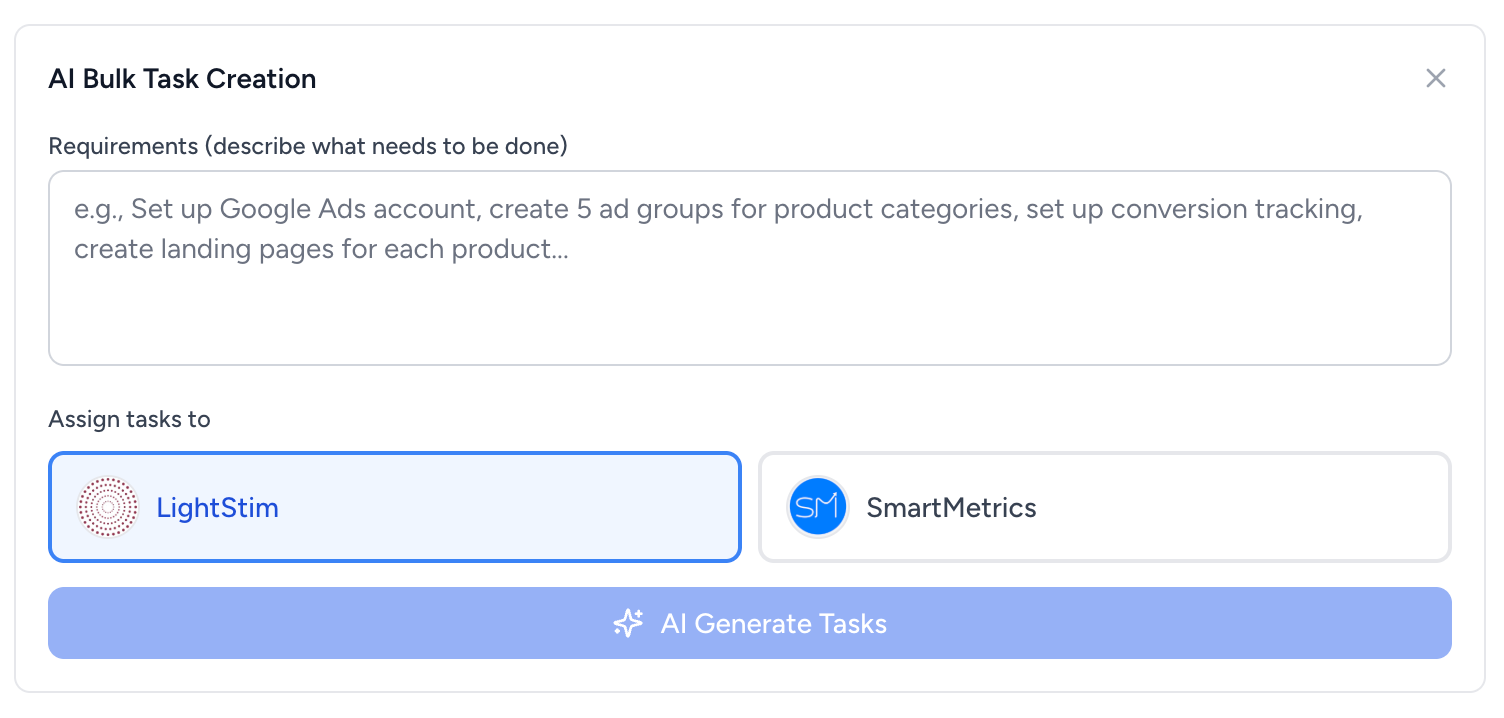
You just finished a kickoff call. You've got meeting notes, a project brief, or a client spec doc sitting in your clipboard. Paste it into SmartMetrics, and the AI generates task cards with descriptions, ready to assign to your team or the client.
A fifteen-point website redesign brief becomes fifteen cards in seconds. You're not sitting there typing each one out manually, and you're not forgetting that one requirement buried in paragraph six of a rambling email. It works for rough meeting notes too. Paste the notes from a strategy call, SmartMetrics pulls out the action items, you assign them, and you're done. What used to eat 20 to 30 minutes of post-meeting admin now takes less than a minute.
This one feature alone changed how we think about project kickoffs. The setup used to be the most tedious part of starting any new engagement. Now it's the fastest.
One Master Board. Every Client. Every Task.
Here's where the difference from tools like Trello or Asana becomes obvious.
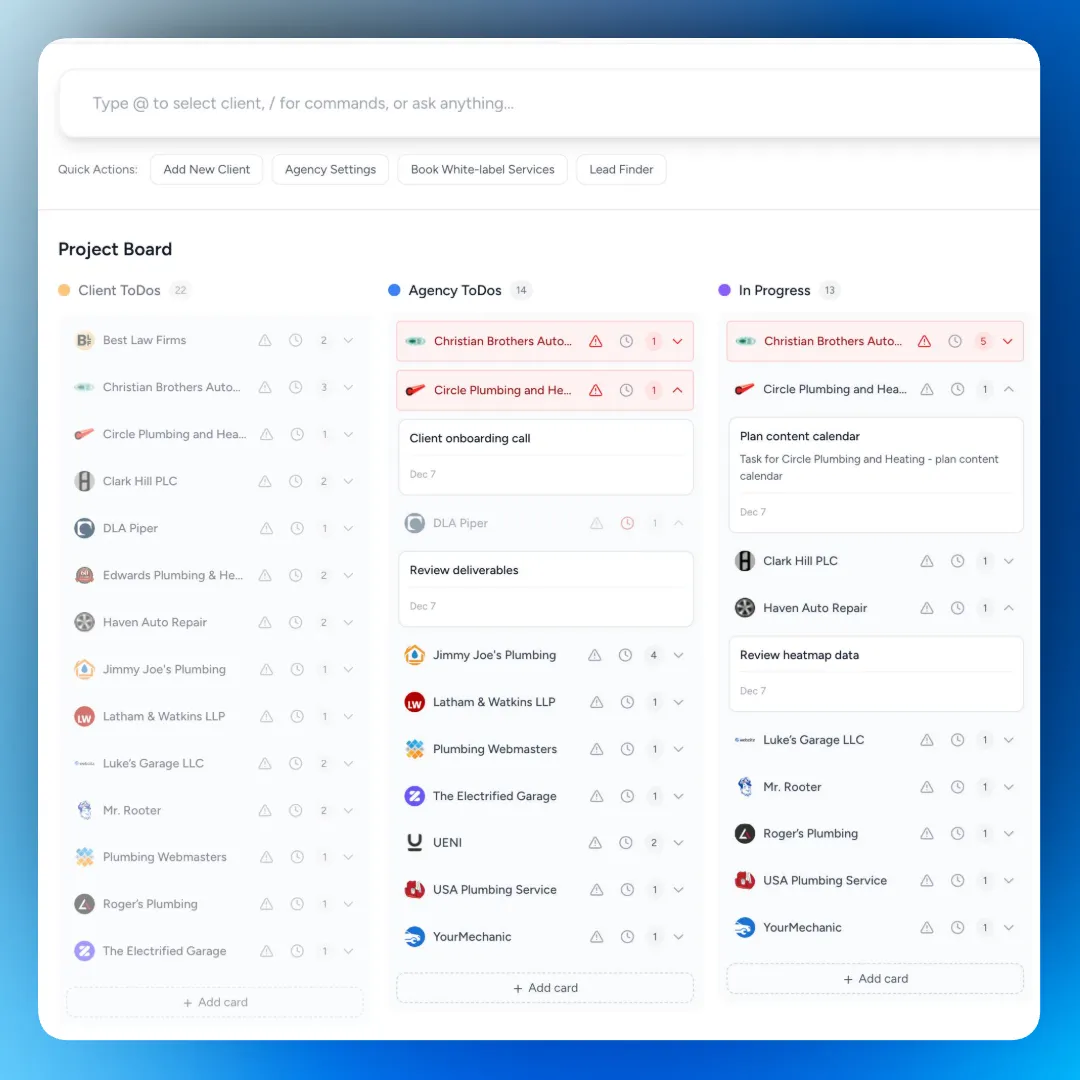
SmartMetrics provides a master project board that lets you view all your clients and their tasks on a single screen. What's on the client's plate, what your team needs to tackle, what's in progress, what's finished. You can filter by client or status, flag urgent items, and identify tasks that are stuck waiting on client action.
Monday morning, you pull up the master board and know exactly where everything stands across your entire agency. You're not clicking through twelve separate project spaces or checking three different client workspaces to figure out who's behind.
Trello and Asana are built around individual projects and workspaces. When you need to zoom out and see the full picture across all your clients, you end up building hacky workarounds or paying for premium features that still don't quite get you there. The master board solves that in one view.
Individual Client Boards That Clients Use
Each client also has their own project board within their client portal. They can see their tasks, add new ones, move cards between columns, and leave comments. No new login, no separate app, no account creation. They open the portal link, and the board is immediately visible.
And when a client adds a new card or moves a task to a different column, your agency gets notified. You stay in the loop without having to check in constantly.
This is the part that tools like ClickUp and Monday miss. They treat client collaboration as an afterthought, where you have to set up guest permissions, limit views, hide internal boards, and hope the client doesn't accidentally wander into your team's workspace. SmartMetrics was built around the agency-client relationship from the start. Clients see their stuff. Your team sees everything. There's no overlap and no confusion.
Why Minimal UX Wins for Agencies
There's a reason the most-used tools in any agency are usually the simplest ones. Slack over email. Google Docs over SharePoint. The tool that gets out of your way is the tool that gets used.
Project management is no different. If your team has to think about how to use the tool, they'll stop using it. If your client needs a tutorial to check their project status, they'll just email you instead. And then you're right back where you started.
SmartMetrics Project Boards work because there's nothing to figure out. A kanban board is a kanban board. Cards go from left to right. Your team updates tasks in two seconds, and clients check progress because the board makes sense at a glance. The "where are we on this?" emails just stop coming.
Less Tool. More Work Done.
The best project management setup is the one your whole team and your clients use. Not the one with the most features or the prettiest Gantt chart. The one that takes zero effort to maintain and gives everyone the visibility they need.
Start free and see how fast your team adopts it.